Bank statement conversion
Turn bank-statement PDFs into clean spreadsheets.
Upload a checking, savings or card statement in any major currency. We extract the transactions, check the arithmetic against the printed balances, and let you download CSV and Excel — after you have seen the preview.
$5 per supported statement, up to 50 pages. Preview before paying. Files are automatically deleted 24 hours after upload.
- USD
- EUR
- GBP
- JPY
- CAD
- AUD
- CHF
| Date | Description | Amount | Balance |
|---|---|---|---|
| 2025-01-03 | ACME PAYROLL DIRECT DEP | 2,500.00 | 7,500.00 |
| 2025-01-05 | RENT PAYMENT | -1,250.00 | 6,250.00 |
| 2025-01-12 | GROCERY MARKET #204 | -180.00 | 6,070.00 |
Example output from a synthetic statement. Balance checks confirm arithmetic consistency, not document authenticity or guaranteed extraction accuracy.
Upload, preview, download
Three steps, no account manager, no bank login, and no subscription.
Upload
A single PDF, up to 20 MB and 50 pages. We validate the file itself before any parsing starts.
Preview
See the statement period, transaction count, a five-row preview and an itemised validation report.
Download
Pay $5 for CSV and Excel with the same transactions. Files stay available until the 24-hour deletion deadline.
Why this is different from other statement converters
Most converters promise accuracy. This one proves it on your document before asking for money — and refuses the sale when the arithmetic does not hold.
| What matters | Bankora | Subscription converters | Generic PDF → Excel tools |
|---|---|---|---|
| Charged for a bad extraction | Never — purchase is blocked | Usually yes | Yes |
| Arithmetic checked | Every row, against the printed balances | Rarely verified | Not checked |
| Output before you pay | Five real rows and an itemised report | Sometimes a preview | No |
| What it costs | $5 once, or $19 for ten. No subscription | Typically $10–$149 per month | Free, bundled in a PDF suite |
| How long the statement is kept | Deleted automatically after 24 hours | Stored in your account until you delete it | Varies by suite |
| Currencies | Major currencies with the right decimals — yen has none | Rarely stated; two decimals assumed | Two decimals |
| A file we cannot read | Rejected, with nothing charged | Varies | You get a malformed sheet |
Rows for other tools describe what their public pages advertise, checked in November 2026 — not a hands-on test of each one, and their behaviour can change. Every Bankora row above is enforced in the product itself: the purchase button stays disabled until the reconciliation check passes, and the deletion runs on a schedule rather than on a promise.
The one difference that matters
A converter can return a file that looks perfect and is wrong by one row. For a tax return, a mortgage application or a lender review, a wrong spreadsheet is worse than no spreadsheet. So the gate here is arithmetic: opening balance plus credits minus debits must equal the closing balance the bank printed, and each row must match its own running balance. If that fails, the document is not for sale — at any price.
The exact output, before you pay
This is the workbook produced from the sample statement below: three extracted rows, integer-cent amounts, and a balance check that reconciles to the printed closing balance with a difference of zero.
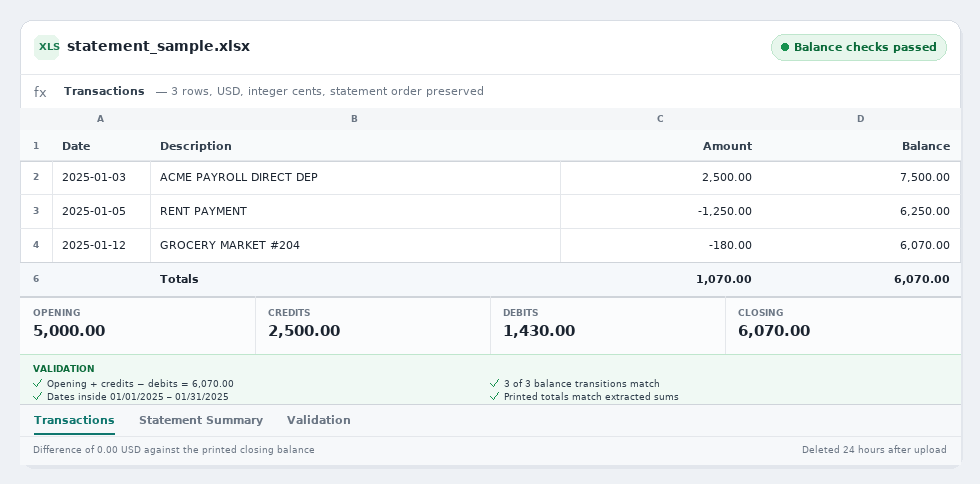
Generated by the real pipeline from this sample PDF; the same rows are in the sample CSV.
Ask about formats, currencies or pricing
An assistant answers questions about the service once you are signed in. Do not paste a statement, account numbers or card details — it cannot read documents and does not need them.
Deliberately narrow
Narrow scope is how the checks stay meaningful.
- Checking, savings and card statements in most major currencies
- One account per document
- Unencrypted PDFs up to 20 MB and 50 pages, scans up to 10 pages
- Separate debit/credit columns or one signed amount column
Not supported
These are rejected without a charge, not half-processed.
- Investment and brokerage statements
- Password-protected or corrupted files
- Multi-account documents
- Scans longer than 10 pages or too blurred to read
- Documents without a recognisable transaction table
What you get
- CSV with Date, Description, Debit, Credit, Amount, Balance, Currency, Reference, Source Page
- Excel workbook with Transactions, Statement Summary and Validation sheets
- Integer-cent amounts, statement order preserved, identical transactions kept
- Spreadsheet-formula neutralisation in text fields
Privacy and retention
Uploaded PDFs are stored privately with no public URL and are processed by a worker that runs separately from the web app. No document content appears in URLs, logs, or analytics. Everything is deleted 24 hours after upload, and you can delete it sooner.
The privacy notice lists every processor that touches your data, and the refund policy covers the cases that are refunded automatically.
Questions
Which statements are supported?
English-language statements in USD, EUR, GBP, JPY and other major currencies, one account per PDF, straight from a bank portal: checking and savings accounts, plus card statements that print a previous and new balance. Scanned and image-only PDFs are read with OCR for up to 10 pages. Investment and brokerage statements, multi-account documents, and password-protected files are rejected.
What does the balance check actually prove?
It proves the extracted transactions are arithmetically consistent with the statement: opening balance plus credits minus debits equals the closing balance, and printed totals match where present. It does not prove the document is authentic, and it is not a guarantee that every row is right.
Do I pay before or after extraction?
After. Upload, wait for processing, and look at the five-row preview plus the validation report. You pay $5 only when the checks pass. Unsupported documents, failed documents, and documents needing review are never charged.
How long are my files kept?
Original PDF, extracted transactions, and generated files are deleted 24 hours after upload. You can delete a conversion earlier from its page. Payment records needed for accounting are kept separately from your document.
Is this financial advice or accounting software?
No. Bankora converts one statement into CSV or Excel. It does not connect to your bank, give financial advice, reconcile against an external ledger, or integrate with accounting tools.
Do you support every bank?
No. Support is defined by a versioned, tested layout list, not by brand. If your statement's layout is not recognised, you get an honest failure and no charge.
Something else? Contact the operator.
Ready with one statement?
$5 per supported statement. No subscription. No charge for unsupported documents.